Reclaim 50GB+Videos Without Quality LossReclaim 50GB+ Videos Without Quality Loss
Formerly CompressX — now even better
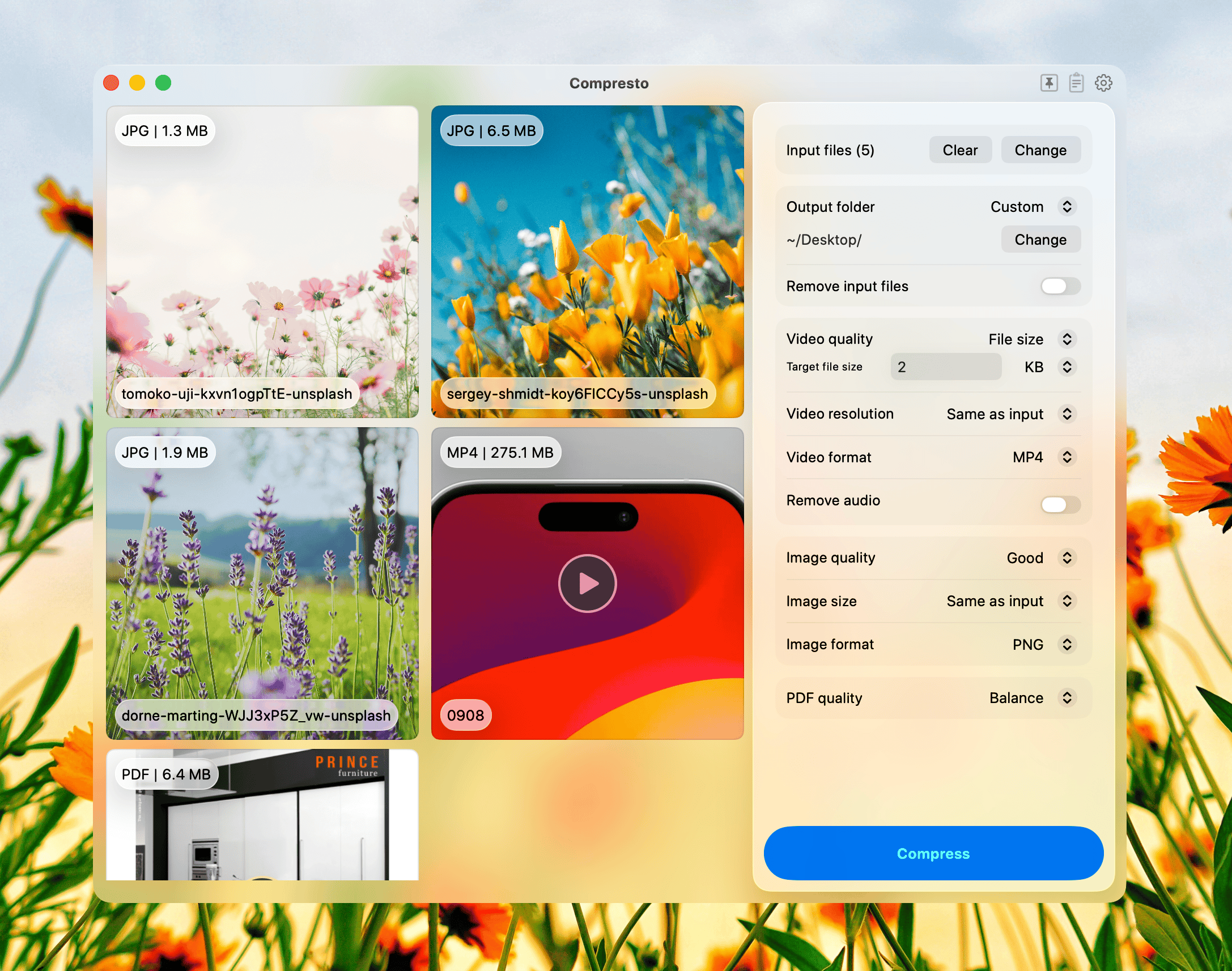
Compresto is a native macOS app that batch compresses videos, images, PDFs, and GIFs — up to 90% smaller with no quality loss, all offline on your Mac.


0+ professionals trust us
to process 0 files , saving a massive 0 gigabytes in storage! 💾✨



4K video, a fraction of the size
Shrink MP4 and MOV files with hardware-accelerated compression — dramatically smaller, with no visible drop in quality.
32.1 MB → 13.3 MB −59%

Lighter images, pixel-perfect
JPEG, PNG, and WebP compressed in seconds while keeping every detail crisp and sharp.
1 MB → 408 KB −60%

Smooth GIFs, half the weight
Keep your loops buttery while cutting the file size in half — ideal for docs, chat, and the web.
16.7 MB → 7.5 MB −55%
Smaller PDFs, same clarity
Compress image-heavy documents so they're easy to email and share — text stays sharp.
1.3 MB → 281 KB −78%Set it and forget it
Watch any folder and Compresto compresses new files automatically the moment they land.
Compress from anywhere
Drop files onto the floating Drop Zone to compress instantly — no need to open the app first.
Turn clips into shareable GIFs
Convert any video to a crisp, lightweight GIF in a couple of clicks.
Compress without leaving your keyboard
Trigger compression straight from Raycast for a fully keyboard-driven workflow.
Everything you need for file compression
Powerful features designed to make your workflow faster and more efficient

Batch Processing
Process hundreds of files simultaneously with intelligent queuing and progress tracking.
Multi-format Support
Compress videos, images, and PDFs all in one app.
Massive Size Reduction
Reduce file sizes by up to 90% in seconds while maintaining perfect visual quality.
Drag & Drop Interface
Simple, intuitive interface that makes compression easy.
Privacy First
All processing happens offline on your Mac - your files never leave your device.
Folder Monitoring
Automatically compress files when added to watched folders.






I've been really enjoying this tool. Great work Hieu!


2024-03-18
Reduced my video from ~50MB to ~5MB! Super easy to use 👍

2024-01-26
Rarely does a tool alter my established 20-year workflow, but this one is a game-changer. In a realm where communication and motion are inseparable, this product stands out for its streamlined process and remarkably compact outputs. A big thank you to Hieu!

2024-01-05
Just what I needed! This is awesome!

2024-04-05
CompressX is a game-changer! A must-have app for optimizing videos and images.

2024-01-18
Unparalleled product in its class

2024-10-04
I've got Photoshop/lightroom that I no longer need to use for importing a big image and then exporting it for web. Saves time plus it's simple no unnecessary extra clicks required

2025-02-10
It was exactly what I needed. CompressX is a game changer. Amazing product
2024-03-18
Reduced my video from ~50MB to ~5MB! Super easy to use 👍
2024-01-26
Rarely does a tool alter my established 20-year workflow, but this one is a game-changer. In a realm where communication and motion are inseparable, this product stands out for its streamlined process and remarkably compact outputs. A big thank you to Hieu!
2024-01-05
Just what I needed! This is awesome!
2024-04-05
CompressX is a game-changer! A must-have app for optimizing videos and images.
2024-01-18
Unparalleled product in its class
2024-10-04
I've got Photoshop/lightroom that I no longer need to use for importing a big image and then exporting it for web. Saves time plus it's simple no unnecessary extra clicks required
2025-02-10
It was exactly what I needed. CompressX is a game changer. Amazing product
2024-03-18
Reduced my video from ~50MB to ~5MB! Super easy to use 👍
2024-01-26
Rarely does a tool alter my established 20-year workflow, but this one is a game-changer. In a realm where communication and motion are inseparable, this product stands out for its streamlined process and remarkably compact outputs. A big thank you to Hieu!
2024-01-05
Just what I needed! This is awesome!
2024-04-05
CompressX is a game-changer! A must-have app for optimizing videos and images.
2024-01-18
Unparalleled product in its class
2024-10-04
I've got Photoshop/lightroom that I no longer need to use for importing a big image and then exporting it for web. Saves time plus it's simple no unnecessary extra clicks required
2025-02-10
It was exactly what I needed. CompressX is a game changer. Amazing product
2024-03-18
Reduced my video from ~50MB to ~5MB! Super easy to use 👍
2024-01-26
Rarely does a tool alter my established 20-year workflow, but this one is a game-changer. In a realm where communication and motion are inseparable, this product stands out for its streamlined process and remarkably compact outputs. A big thank you to Hieu!
2024-01-05
Just what I needed! This is awesome!
2024-04-05
CompressX is a game-changer! A must-have app for optimizing videos and images.
2024-01-18
Unparalleled product in its class
2024-10-04
I've got Photoshop/lightroom that I no longer need to use for importing a big image and then exporting it for web. Saves time plus it's simple no unnecessary extra clicks required
2025-02-10
It was exactly what I needed. CompressX is a game changer. Amazing product

2024-05-17
I ADORE THIS APPLICATION!

2024-04-03
Simple and effective. Great tool!
2023-12-06
Quickly becoming a must-have tool in my toolbox

2024-01-04
I've been really enjoying this tool. Great work Hieu!

2024-01-04
Cool idea. Congrats on the launch Hieu!

2024-01-04
Before this app I would use complicated tools like Handbrake. Even Permute is very feature rich and complex. But CompressX has a breath of fresh air simple design that is just a drag and drop interface. It's very effective and it shows how much space was saved which is very useful. Very recently the creator has also added transparent video support.

2024-01-04
I love this app so much. I use it for every single video I upload or share.

2024-01-04
Been using this for weeks, it works excellent. Finally something to replace Handbrake!!
2024-05-17
I ADORE THIS APPLICATION!
2024-04-03
Simple and effective. Great tool!
2023-12-06
Quickly becoming a must-have tool in my toolbox
2024-01-04
I've been really enjoying this tool. Great work Hieu!
2024-01-04
Cool idea. Congrats on the launch Hieu!
2024-01-04
Before this app I would use complicated tools like Handbrake. Even Permute is very feature rich and complex. But CompressX has a breath of fresh air simple design that is just a drag and drop interface. It's very effective and it shows how much space was saved which is very useful. Very recently the creator has also added transparent video support.
2024-01-04
I love this app so much. I use it for every single video I upload or share.
2024-01-04
Been using this for weeks, it works excellent. Finally something to replace Handbrake!!
2024-05-17
I ADORE THIS APPLICATION!
2024-04-03
Simple and effective. Great tool!
2023-12-06
Quickly becoming a must-have tool in my toolbox
2024-01-04
I've been really enjoying this tool. Great work Hieu!
2024-01-04
Cool idea. Congrats on the launch Hieu!
2024-01-04
Before this app I would use complicated tools like Handbrake. Even Permute is very feature rich and complex. But CompressX has a breath of fresh air simple design that is just a drag and drop interface. It's very effective and it shows how much space was saved which is very useful. Very recently the creator has also added transparent video support.
2024-01-04
I love this app so much. I use it for every single video I upload or share.
2024-01-04
Been using this for weeks, it works excellent. Finally something to replace Handbrake!!
2024-05-17
I ADORE THIS APPLICATION!
2024-04-03
Simple and effective. Great tool!
2023-12-06
Quickly becoming a must-have tool in my toolbox
2024-01-04
I've been really enjoying this tool. Great work Hieu!
2024-01-04
Cool idea. Congrats on the launch Hieu!
2024-01-04
Before this app I would use complicated tools like Handbrake. Even Permute is very feature rich and complex. But CompressX has a breath of fresh air simple design that is just a drag and drop interface. It's very effective and it shows how much space was saved which is very useful. Very recently the creator has also added transparent video support.
2024-01-04
I love this app so much. I use it for every single video I upload or share.
2024-01-04
Been using this for weeks, it works excellent. Finally something to replace Handbrake!!
Frequently Asked Questions
What is Compresto?
Compresto is a native macOS app that batch compresses videos, images, PDFs, and GIFs. It reduces file sizes by up to 90% while preserving quality, and runs entirely offline on your Mac.
Which file types can Compresto compress?
Compresto supports the most common media formats: MP4, MOV, and other major video codecs; PNG, JPEG, HEIC, WebP, TIFF, and GIF for images; and standard PDF files.
Does Compresto reduce image or video quality?
Compresto offers multiple quality presets. At the Highest and High presets, quality loss is typically imperceptible to the naked eye. Lower presets trade more quality for smaller file sizes.
Does Compresto work offline?
Yes. All compression happens locally on your Mac using Apple Silicon hardware acceleration. Your files never leave your device — there is no upload required.
Can Compresto batch compress multiple files?
Yes. You can drop hundreds of files or entire folders into Compresto and it will process them in parallel with progress tracking.
Is there a Windows or Linux version?
No. Compresto is built specifically for macOS to take advantage of VideoToolbox and Apple Silicon hardware encoders. There are no current plans for Windows or Linux.
How much can Compresto reduce file sizes?
Typical reductions range from 50% to 90% depending on source format, codec, and the chosen quality preset. 4K videos often see the largest savings.