Compresto v1.33 update: Introducing the Compresto CLI, Queue Recovery & Copy File Paths
🚀 Version 1.33 is Live
This release comes with something new: Compresto now has a command-line tool. The same compression you know from the Mac app now works in the Terminal, and it runs on the license you already have.
The Mac app gets a lot more reliable too. Long batches now survive a crash, a forced shutdown, or a quit. Damaged videos and stray files in a dropped folder can no longer trip up a run, and Compresto stops trying to become the default app for your videos. You can also copy output paths as text, and the folder tree is easier to scan.
💻 Introducing the Compresto CLI
Compresto now has a command-line version. The Compresto CLI compresses and converts videos, images, GIFs and PDFs from the Terminal, with the same quality presets as the Mac app. It's handy for scripts, automation, and AI coding agents.
It installs with Homebrew:
brew install dqhieu/tap/compresto
The CLI uses your existing Compresto license, so there's nothing new to buy. In 1.33, the Mac app and the CLI share a single activation on the same Mac, so together they count as one device, not two:
- If the Mac app is already activated,
compresto auth loginsigns you in straight away. - If you signed in to the CLI first, the Mac app reuses that activation.
- Unlink Device in the app signs the CLI out as well, so the device slot is really freed.
We'll share more about the CLI in its own post soon. Until then, the CLI page has examples and answers to common questions.
💾 Queue Recovery
Big batches take time, and a lot can happen before they finish: a crash, a forced restart for a macOS update, or simply quitting before you meant to. Before, any of these meant dropping your files back in and setting everything up again.
Now Compresto saves the files that are still waiting as it works: after every file it finishes, and again when you quit. The next time the main window opens empty, you'll see a popup saying how many files from your last session weren't compressed, with two choices:
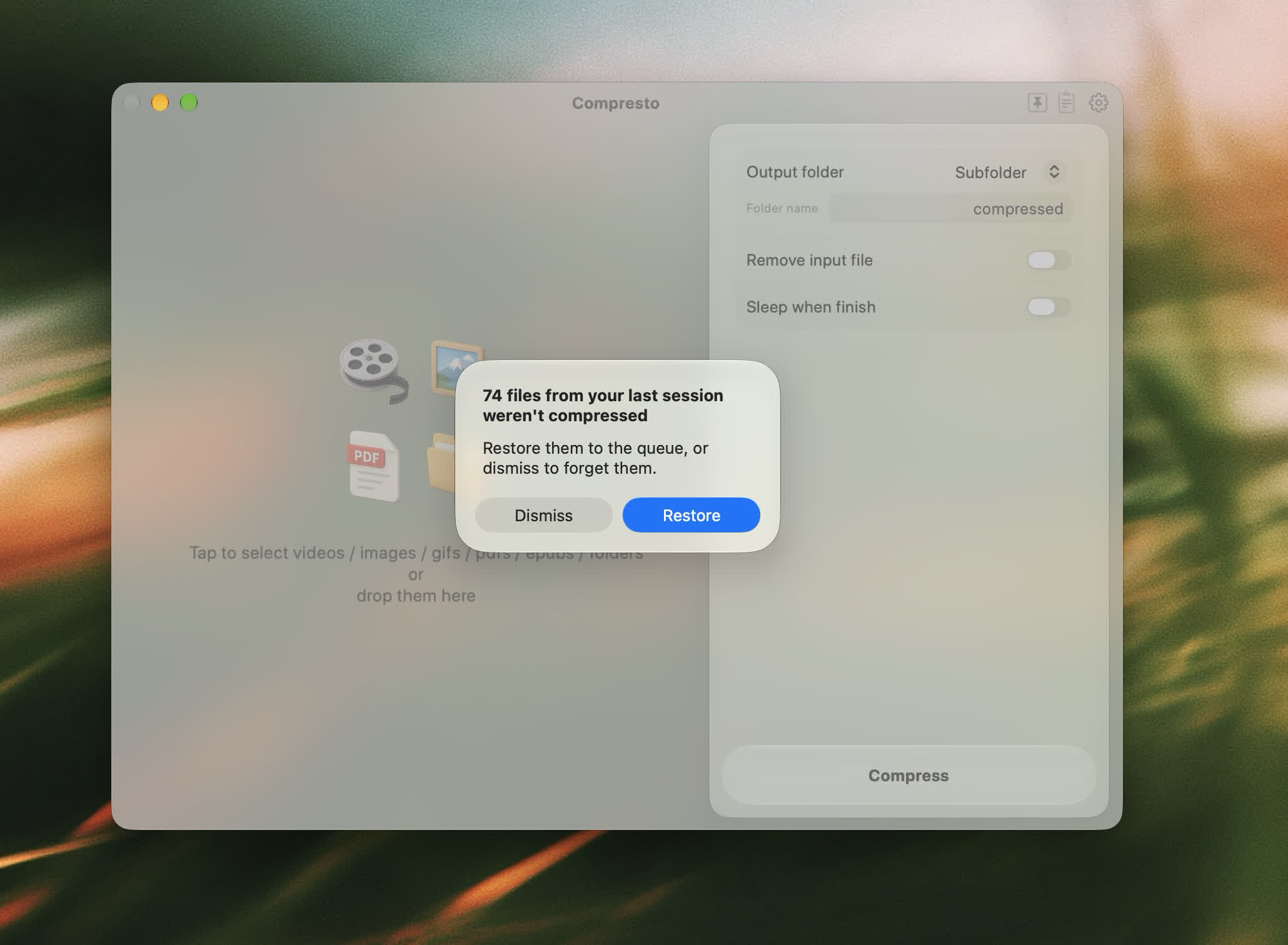
- Restore puts them back in the queue.
- Dismiss forgets them.
Restored files come back the way you left them:
- Each file keeps its trim points and per-file settings.
- Dropped folders come back too, so the folder tree looks the same as before.
- Nothing starts on its own. Check the queue, then press compress when you're ready.
If a file was halfway through compressing when things stopped, its half-written output is moved to the Trash. That way the re-run doesn't create a "name 1" file next to a broken one. If the original file is gone, the partial output stays where it is, since it may be the only copy left.
You won't be asked about files you've already dealt with. Finishing or stopping a batch, clearing the window, or closing the last window while nothing is running all clear the saved queue.
📋 Copy File Paths
Copy to clipboard after compressing used to be a simple on/off switch that put the output files on the clipboard. It's now a three-way setting in Settings → File Management:
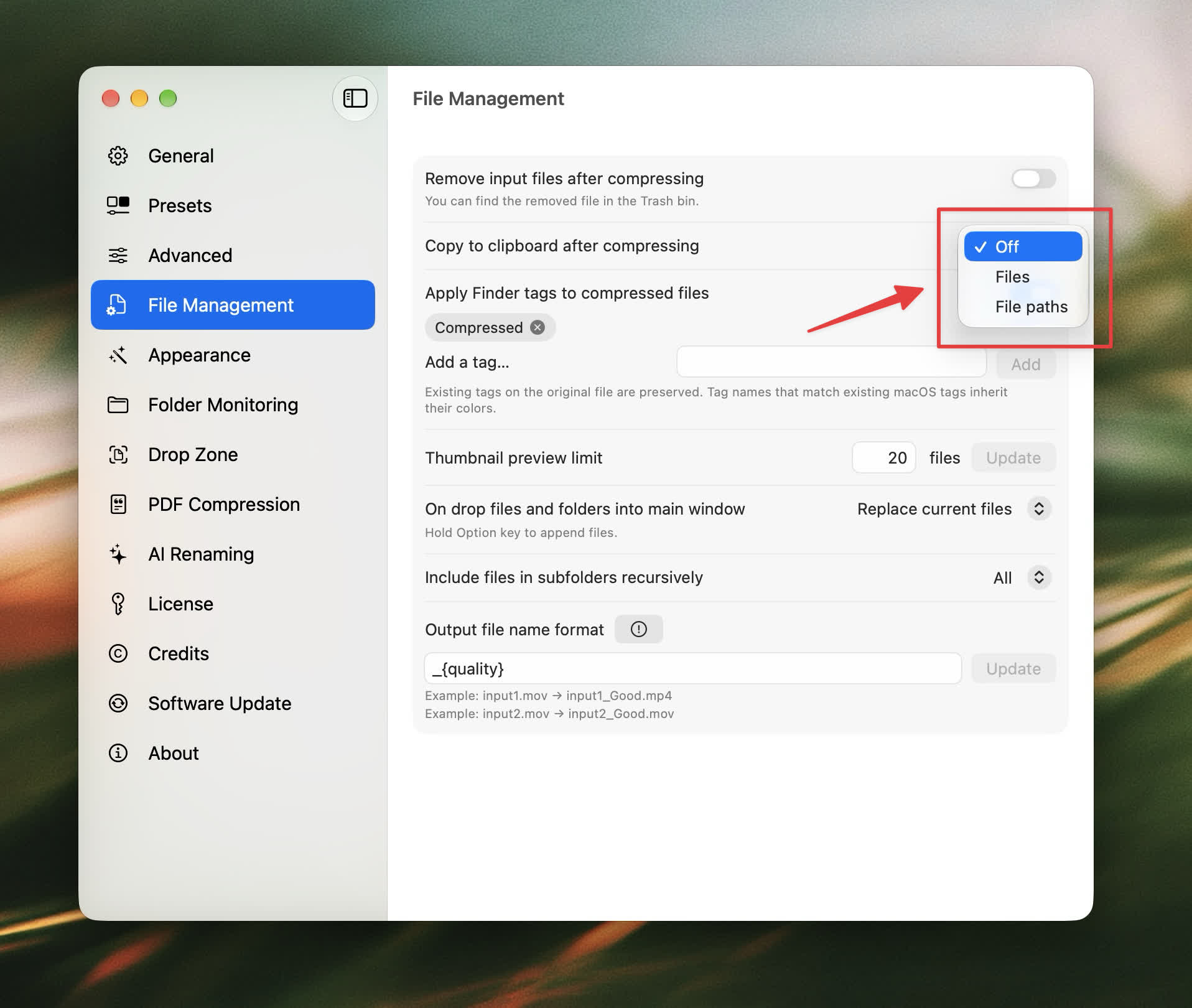
- Off leaves the clipboard alone.
- Files copies the output files, ready to paste into Finder or another app.
- File paths copies the full path of each output file as text, one per line.
File paths are handy when the next step is text, not Finder: pasting into a terminal, a script, a chat message, a Markdown doc, or a code editor.
The notch bar also has a new Copy path button (or Copy paths for more than one file), so you can grab a path from a single result without changing your setting. If you rename a file from the notch, the clipboard is updated to the new name, so you never paste a path that no longer exists.
🎨 Color-Coded Icons in the Folder Tree
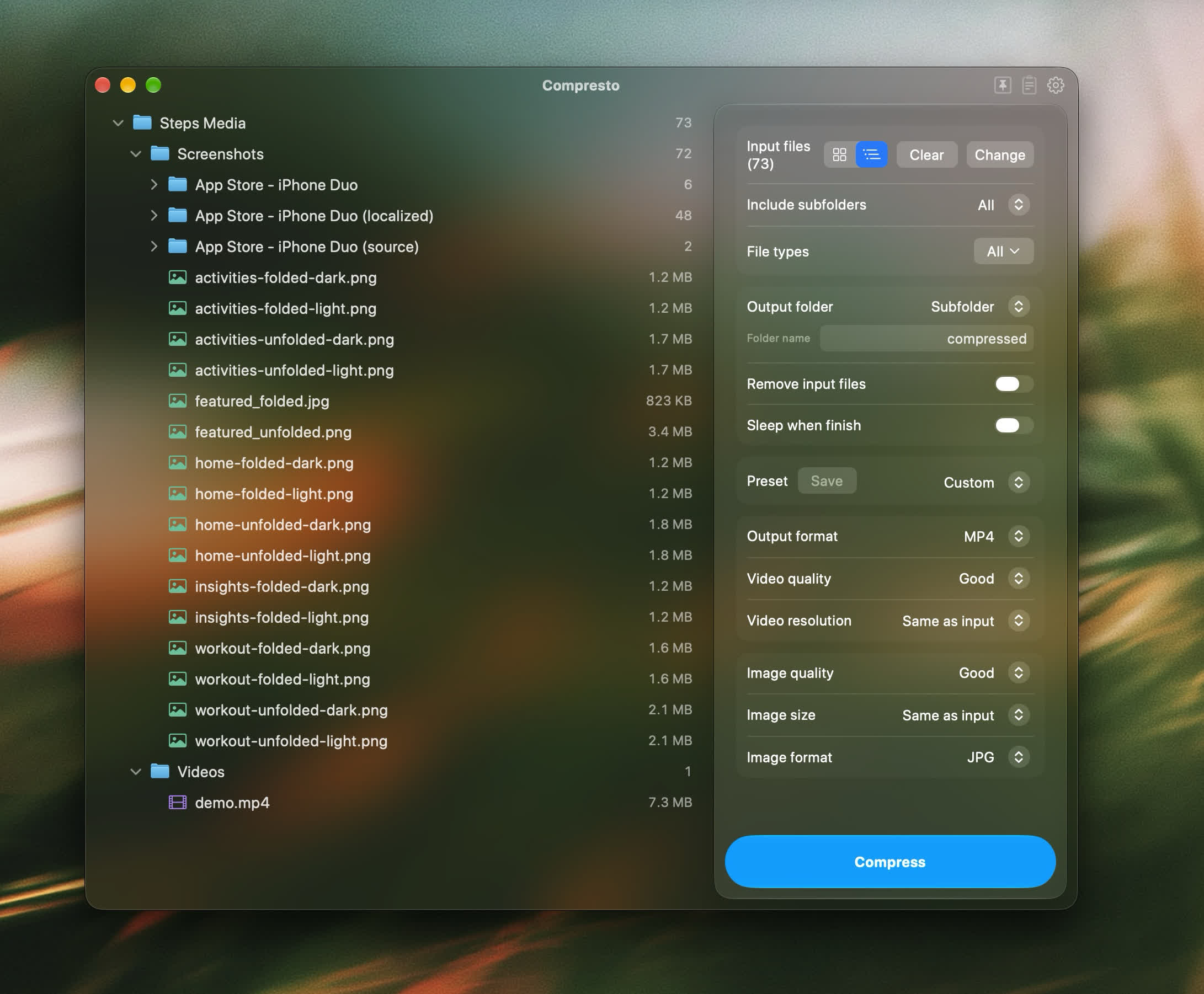
The folder tree now uses Finder's real folder icons and a color for each file type, so you can tell videos from images at a glance in a big mixed folder.
🧰 Tidier Helper Tools
Compresto's helper tools, like gifski, now live in ~/Library/Application Support/Compresto/Dependencies instead of a hidden folder in your home folder. Existing installs move there automatically, and gifski is updated to 1.34.0.
🐞 Bug Fixes
- Compresto no longer takes over your MP4 files. macOS could make Compresto the default app for MP4 videos, so double-clicking a video opened Compresto instead of QuickTime Player. Compresto now tells macOS it's only a viewer for the files it supports, so your usual apps stay the default.
- No more crash on unsupported files. Dropping a folder that contained an unsupported file, such as a .zip, while a batch was running could crash the app. Unsupported files are now skipped.
- Damaged videos fail properly. A video that Compresto couldn't read used to count as compressed. It now shows as failed, any partial output is removed, and the original is never moved to the Trash because of it, even with Remove input file(s) turned on.
- Smoother video previews. Video thumbnails and the full-size player now load without freezing the app.
🛍️ Black Friday: 40% Off Every Plan
If you've been waiting for a good moment to get Compresto, this is it. Our Black Friday deal takes 40% off every plan with code BFCM26, until December 4, 2026.
| Plan | Macs | Regular price | With BFCM26 |
|---|---|---|---|
| Personal (Lifetime) | 1 | $49 | $29.40 |
| Standard (Lifetime) | 2 | $69 | $41.40 |
| Lite | 1 | $7/month | $4.20 first month |
| Personal | 1 | $19/year | $11.40 first year |
| Standard | 2 | $29/year | $17.40 first year |
- Lifetime licenses are the best deal. Pay once, keep Compresto forever, and get every future update, including everything in 1.33.
- Your license now covers the CLI too. The same key activates the Mac app and the Compresto CLI on your Mac, and together they count as one device.
- Every plan includes the full app. There are no feature tiers, only how many Macs you can use and whether you pay once or on a schedule.
- Risk-free. Every purchase comes with a 3-day money-back guarantee.
To redeem it, pick a plan on the pricing page and enter BFCM26 at checkout. The banner at the top of every page on compresto.app has a copy button for the code. After December 4, the code stops working and prices go back to normal.
That's 1.33. As always, thanks for the feedback — keep it coming.