Digital Marketing Asset Management Your Complete Guide
Ever find yourself digging through a labyrinth of folders named "Final_Logo_v3_USE_THIS_ONE.jpg"? If that sounds familiar, you've felt the pain that digital marketing asset management is designed to solve. It’s the process and technology used to wrangle all your brand’s creative files—from logos and product shots to videos and social media graphics—into one organized, easily accessible place.
Think of it like a conductor leading an orchestra. Each musician has the right sheet music, plays on cue, and contributes to a single, beautiful performance. That’s what asset management does for your brand.
What Is Digital Marketing Asset Management Really?
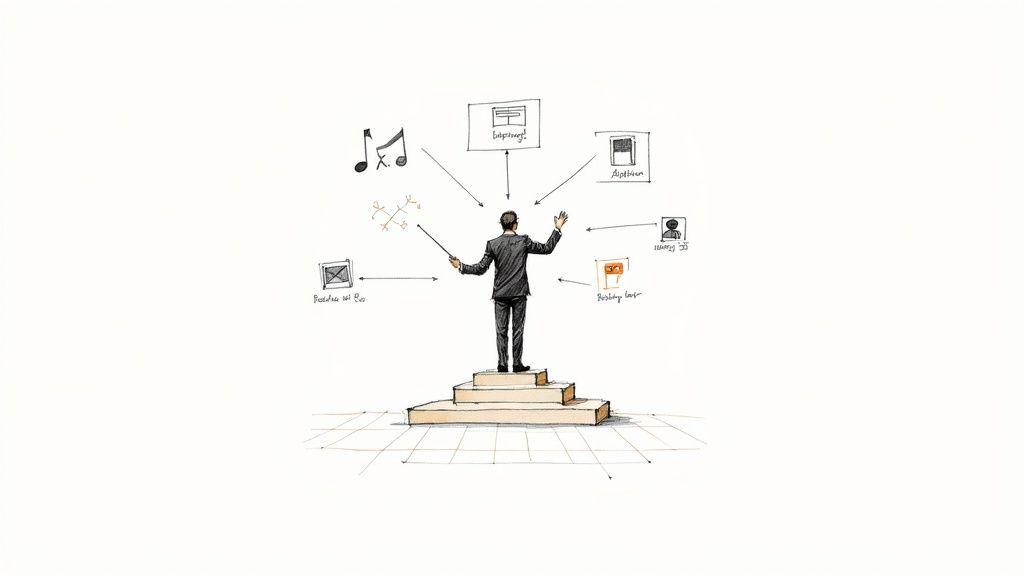
At its heart, digital marketing asset management is the cure for creative chaos. It’s far more than just a fancy Dropbox or Google Drive folder. It adds a layer of intelligence that brings order, control, and efficiency to how your brand’s content is created, shared, and used. This system becomes the central nervous system for your entire marketing operation.
Picture this all-too-common scene: a sales rep needs the latest product one-pager for a big meeting, the social media manager is hunting for an approved video clip from last quarter's campaign, and a partner agency is asking (for the third time) for high-res logos. Without a central system, this descends into a frantic mess of emails, Slack messages, and outdated files, often resulting in inconsistent branding.
The Problem Asset Management Solves
The core problem is fragmentation. When your marketing materials are scattered across personal hard drives, different cloud services, and buried in email threads, chaos is inevitable. This disorganization isn't just annoying; it leads directly to wasted time, duplicated work, and a brand message that gets weaker with every off-brand graphic used.
A digital asset management system isn't just a place to store files; it's a strategy to maximize the value of your creative investments. It ensures every piece of content works harder for your business.
This strategic approach is no longer a "nice-to-have." Companies are pumping out more content across more channels than ever before, and the need for a system to manage it all is critical. The market reflects this urgency: the global Digital Asset Management (DAM) market, valued at USD 4.59 billion in 2024, is expected to explode to over USD 16 billion by 2032. This shows just how many businesses are getting serious about structured content management.
A Day in the Life Before and After Asset Management
The best way to grasp the impact is to see it in action. This table paints a clear picture of how a typical marketing day changes when you move from chaos to control.
| Marketing Task | Without Asset Management (The Chaos) | With Asset Management (The Control) |
|---|---|---|
| Launching a Social Campaign | Wastes 30 minutes searching for the right image sizes and approved copy. Emails the designer to confirm which version is final. | Pulls pre-approved, correctly sized graphics from a "Social Media Q3" collection in seconds. All assets have metadata showing they are ready for use. |
| Onboarding a New Partner | Spends an hour compiling logos, brand guidelines, and product photos into a zip file. Realizes a week later they sent an old logo. | Shares a secure, branded portal with the partner, giving them self-serve access to only the assets they are permitted to use. |
| Updating Website Imagery | Asks the team in a group chat, "Does anyone have that new photo from the event?" Receives three different, low-res versions. | Searches the system for "2024 Annual Event" and filters by "approved for web." Downloads the high-resolution file in under a minute. |
| Repurposing a Video for Ads | The video editor can't find the original project file and has to re-edit a compressed version, losing quality. | The original 4K video file, all related graphics, and usage rights information are stored together, ready for the video editor to access. |
The difference is night and day. One path is filled with friction and wasted effort, while the other is built for speed and consistency.
More Than Just a Digital Library
A true digital marketing asset management solution turns a passive library into an active, intelligent hub. It does this by adding powerful features that basic cloud storage just can't touch:
- Version Control: No more guesswork. Everyone on your team, in any department, accesses the most current and approved version of an asset. This single feature completely eliminates the risk of using outdated materials.
- Access Permissions: You get granular control over who can view, edit, download, or share specific assets. This protects sensitive information and ensures brand governance is automatically enforced.
- Metadata and Tagging: This is the secret sauce. Advanced tagging lets users find assets based on campaigns, usage rights, products featured, or even the colors in an image. Searches become incredibly fast and intuitive.
- Streamlined Collaboration: Instead of messy email chains, feedback and approval cycles happen right within the system. You can see a full history of comments and sign-offs, all tied to a well-defined digital asset management workflow.
The True ROI of Managing Your Marketing Assets
Let's move past the theory and talk about what really matters: the tangible results that hit your bottom line. Putting a solid digital marketing asset management system in place isn't just a spring-cleaning project for your files. It’s a strategic investment, and one that pays you back in reclaimed time, serious cost savings, and a protected brand.
At its heart, a central hub for your assets is a direct attack on the hidden costs of chaos. Just think about all the time your team wastes hunting for a specific file, double-checking if they have the right version of the logo, or worse, recreating an image they simply can't find. These little moments of friction add up, draining productivity and pulling your best people away from big ideas and into busywork.
Reclaiming Your Most Valuable Resource: Time
Time is the one thing you can never get back, and digging through messy folders is a notorious time thief. When your team can find exactly what they need in seconds, not hours, the entire marketing engine starts to run faster.
Imagine a global product launch. Without a central system, the team in Sydney might use slightly different branding than the one in San Francisco. They might pull the wrong product specs or delay a critical social post while waiting for someone to email them the right image. A proper asset platform eliminates all that, giving everyone a single source of truth for a coordinated, on-time launch.
Here's a number that really drives this home: Organizations with a DAM system save an average of 13.5 hours per week on asset-related tasks. That’s nearly 34% of a workweek handed back to your team for actual marketing.
This efficiency means your marketers can finally focus on what they were hired to do—crafting amazing campaigns and connecting with customers, not playing digital librarian.
Driving Down Costs and Protecting Brand Integrity
The financial perks go way beyond just getting hours back. By cutting out redundant work and making your whole operation smoother, a well-managed asset library delivers real, hard-dollar savings.
Here’s how:
- Reduced Asset Recreation: When designers can easily find and reuse existing photos, videos, and graphics, you stop paying for unnecessary photoshoots or freelance work to create something you already had.
- Minimized Compliance Risks: A good system keeps track of usage rights and licenses. This prevents your team from accidentally using an expired stock photo or an unapproved image, saving you from potentially huge legal fines.
- Enhanced Brand Consistency: Every off-brand social post or ad that gets out there weakens your brand and confuses your audience. A central system is your brand’s bodyguard, making sure only approved, on-brand materials see the light of day.
To truly see how this all connects to the bottom line, it's essential to know how to calculate return on ad spend. When every ad is powered by the most effective and on-brand creative, you’re not just saving time—you’re directly improving your campaign performance and financial returns.
The Must-Have Features for Your DAM Platform
When you're picking a platform for digital marketing asset management, you're doing more than just choosing a new spot to dump files. A good system is the command center for your entire brand, turning a messy, static library into a dynamic engine that powers your marketing.
But not all DAM solutions are built the same. Knowing which features are truly non-negotiable is the key to getting it right.
A powerful DAM isn't just another cloud drive; it’s an intelligent system designed to solve real marketing headaches. We're talking about finding files in a flash, keeping your brand looking consistent everywhere, and making team collaboration feel effortless. Think of it this way: you can store your tools in a cluttered garage, or you can have a professionally organized workshop. Both hold your stuff, but only one helps you build amazing things efficiently.
Advanced Search and Metadata Tagging
The heart of any great DAM is the ability to find exactly what you need, right when you need it. This is where metadata—all the descriptive info attached to a file—becomes your secret weapon. Instead of digging through endless, confusingly named folders, your team can search using plain language.
Imagine someone on your team typing in "blue running shoe, lifestyle photo, Q3 campaign, approved for web" and instantly getting the perfect image. That’s the power of good metadata, and it’s fueled by a few key features:
- AI-Powered Auto-Tagging: The system is smart enough to "see" what's in an image or video and automatically add useful keywords like "laptop," "office," or "team meeting."
- Custom Fields: You can create your own unique tags that make sense for your business, like product SKUs, campaign names, or internal project codes.
- Faceted Search: This lets you filter search results using multiple criteria at once—like file type, orientation, and usage rights—to quickly zero in on the right asset.
When you get your metadata right, you eliminate those soul-crushing, time-wasting searches that grind productivity to a halt. To keep everything tidy, you'll also need clear guidelines. A great starting point is to nail down some solid file naming conventions best practices, which work hand-in-hand with your tagging strategy.
Granular Permissions and Version Control
Knowing who can see, edit, and download your assets is absolutely critical. It’s about protecting your brand and staying out of legal trouble. A top-tier DAM gives you granular control over user permissions, letting you create specific roles for different people.
For instance, you can give your external agency access to download final, approved logos while making sure they can’t even see rough drafts or works-in-progress.
A great DAM doesn't just store assets; it protects them. Robust access controls and version history are your first line of defense against brand inconsistencies and costly compliance errors.
Just as important is version control. This simple but powerful feature ensures that everyone is always using the latest, approved version of any file. When a logo gets a refresh or a product photo is retouched, the old one is automatically archived. The new file becomes the one and only "single source of truth." This prevents outdated or unapproved assets from accidentally sneaking into a live campaign, which is a massive win for your brand’s reputation.
Seamless Integrations and Performance Analytics
Your DAM shouldn’t live on an island. To be truly effective, it has to connect and "talk" to the other tools your marketing team uses every day. Look for a platform that has ready-made integrations with your go-to software:
- Content Management Systems (CMS): Think WordPress or Drupal, so you can push images and videos straight to your website without a hassle.
- Project Management Tools: Connections to platforms like Asana or Trello let you link assets directly to specific tasks and projects.
- Creative Software: An integration with the Adobe Creative Cloud is a game-changer, allowing designers to pull assets and save new versions without ever leaving their apps.
These connections create a smooth, uninterrupted workflow and cut out the tedious cycle of downloading and re-uploading files.
To round things out, many modern DAMs also offer performance analytics. This is where you get real data on your assets. You can see which ones are downloaded the most, where they're being used, and which visuals are driving the best engagement. This kind of insight helps you stop guessing and start making smarter, data-backed decisions about the content you create next.
The right combination of these features turns a DAM from a simple storage locker into an active, strategic tool for your entire marketing operation. It helps you work faster, smarter, and with far more confidence in your brand's consistency.
How AI Is Reshaping Asset Management
Artificial intelligence isn't some far-off concept anymore; it's the engine running under the hood of modern digital marketing asset management. AI is transforming static digital libraries into smart, active systems that predict what you need and handle the tedious work, completely changing the game for marketing teams. This means marketers can finally step away from the manual grind and get back to thinking about big-picture strategy.
At its simplest, think of AI as the most efficient digital assistant you've ever had. Remember all those hours spent manually tagging every new photo and video? AI-powered auto-tagging does it in seconds. It looks at an asset, recognizes objects, people, and even the mood, then slaps on the right metadata. Suddenly, your entire library is searchable and impeccably organized.
From Simple Sorting to Smart Creation
But AI is moving beyond just organizing your files; it's becoming a creative partner. The explosion of generative AI means systems can now create new versions of your assets on the fly. Need to turn a vertical ad into a horizontal one? Or maybe you need a new background color or different ad copy for a specific audience? AI can churn out these variations almost instantly, which massively speeds up campaign launches.
And this isn't a niche trend. A whopping 78% of senior marketing executives now consider AI essential for business efficiency. The market for generative AI in content creation was valued at USD 11.6 billion in 2023 and is projected to skyrocket to USD 163.8 billion by 2033. Those numbers tell a clear story.
To see this in action, just look at platforms that offer AI-powered UGC ad creation. These tools are a perfect example of how automation can produce effective, high-volume content that actually performs.
Using Predictive Power to Make Better Bets
Maybe the most powerful way AI is changing asset management is through its ability to predict what will work. By digging through performance data from past campaigns, AI can forecast which assets are most likely to click with certain audiences on specific channels.
AI flips asset management from a reactive filing cabinet into a predictive powerhouse. It stops asking, "Where is the asset?" and starts answering, "Which asset will perform best for this campaign?"
This data-first approach takes the guesswork out of creative decisions. Imagine a system suggesting the top three images for your next email blast based on past click-through rates, or pointing you to a video clip that always drives conversions. This is where intelligent asset management is heading—a place where every creative choice is backed by solid data, leading to campaigns that hit harder and deliver more.
Your Step-by-Step Implementation Plan
Getting a digital marketing asset management system up and running is about more than just buying new software. It’s about fundamentally changing how your team operates—for the better. To go from digital chaos to a clean, single source of truth, you need a solid game plan. Breaking the transition into manageable phases makes the whole process smoother and gets everyone on board.
Think of it like building a house. You wouldn't just start hammering nails and hope for the best; you'd start with a detailed blueprint. This plan is your blueprint, guiding every step to make sure you end up with something strong, functional, and built to last.
Phase 1: Audit and Organize
Before you can build your new system, you have to know what you're working with. This first phase is all about discovery and laying a logical foundation.
-
Conduct a Comprehensive Asset Audit: The first step is a digital treasure hunt. Go through every shared drive, individual laptop, cloud account, and email chain to gather every marketing asset you have. This process is great for uncovering duplicates, spotting outdated files, and rediscovering valuable content you completely forgot existed.
-
Develop a Folder Structure: Now, create a folder system that just makes sense. A popular method is to organize by year, then by campaign, and then by content type (like "Images," "Videos," or "Documents"). The real goal is to build something so intuitive that a new team member could find what they need without a guide.
-
Create a Metadata Taxonomy: This is the secret sauce to making your assets searchable. Decide on a consistent set of keywords and tags your team will use for everything. Your taxonomy should cover the basics like campaign name, product line, usage rights, and asset type.
This is where modern tools can really lend a hand. AI, for example, can automate much of the tedious work like tagging.
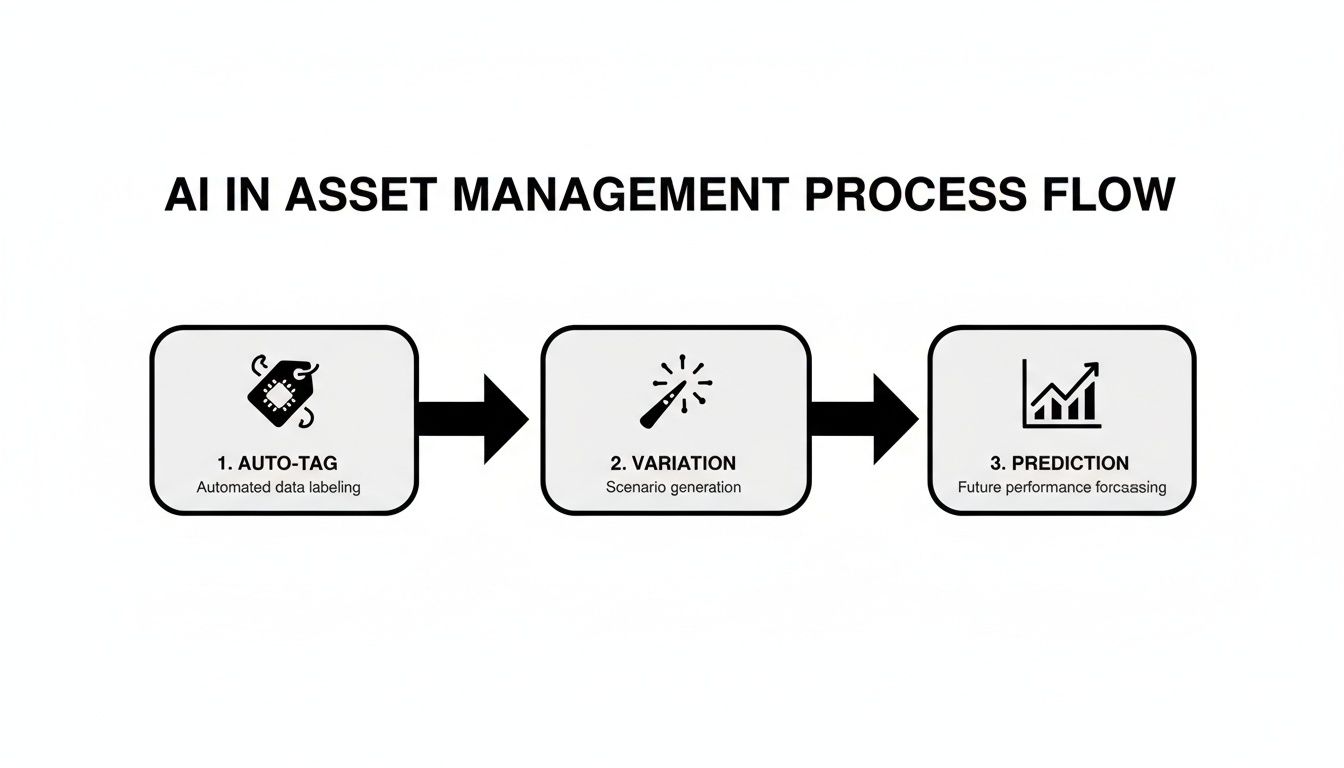
As you can see, the process flows from auto-tagging new assets to creating variations and even predicting performance. This shows how a smart system can handle the heavy lifting once you've set the ground rules.
Phase 2: Configure and Migrate
With your blueprint in hand, it’s time to start building your new digital home and moving everything in. This phase is all about the technical setup and, just as importantly, the people who will be using it.
First things first, set up user roles and permissions. Figure out who needs access to what. For instance, your designers will need to upload and edit files, but the sales team might only need to view and download final, approved materials. Getting this right from the start is key to keeping your assets secure and your brand consistent.
Next, you need to migrate your assets. A word of advice: don't try to move everything at once. Start with your most recent and important assets, applying your new folder structure and metadata tags as you go. Many teams find it helpful to learn how to automate repetitive tasks at this stage; it can make the migration process way faster.
Phase 3: Train and Govern
You can have the best system in the world, but it’s completely useless if your team doesn't know how to use it. This final phase is all about onboarding everyone and setting rules to keep things from getting messy again.
A successful DAM implementation is 10% technology and 90% people. Your focus should be on clear training, demonstrating value, and making the system an indispensable part of your team's daily workflow.
Schedule training sessions for different roles. Don't just show them how to use it; show them why it makes their jobs easier. Focus on the real-world benefits, like finding files in seconds or sharing campaigns without endless email threads.
Finally, create and share a clear governance guide. This document should spell out your file naming rules, tagging requirements, and approval processes. It’s the rulebook that will keep your new digital marketing asset management system organized and effective for years to come.
Common Questions About Asset Management
As you start digging into the world of digital marketing asset management, a few questions probably pop into your head right away. It's totally normal. Getting straight answers to these is key before you decide to jump in.
Let’s clear up some of the most common questions I hear. We'll talk about the real-world differences between tools, the right time to make a move, and what you can expect in terms of cost.
How Is a DAM Different From Cloud Storage?
This is the big one, the question I get asked more than any other. And the answer really comes down to one word: intelligence.
Think of cloud storage services like Google Drive or Dropbox as digital filing cabinets. They're fantastic for storing and sharing files. You put things in, you take them out. Simple.
A Digital Asset Management (DAM) system, however, is a completely different beast. It's more like a smart, searchable library with a built-in librarian who knows where everything is, who's allowed to see it, and how it’s been used before. It doesn’t just hold your assets; it brings them to life.
Cloud storage is about storing files. A DAM is about activating the value within those files by making them searchable, controllable, and measurable.
Here’s where you’ll really see the difference:
- Smarter Search: A DAM uses rich metadata and AI-powered tags to let you find assets in incredibly specific ways—by color, usage rights, campaign name, or even the content within an image. Your basic cloud drive just can't do that.
- Ironclad Version Control: It’s a single source of truth. A DAM ensures everyone is using the latest, approved version of a file and archives the old ones, which helps prevent those costly and embarrassing mistakes.
- Granular Permissions: You get total control. DAMs let you define exactly who can see, edit, or download certain assets, which is critical for protecting your brand and staying compliant.
When Does My Business Need a DAM?
Knowing the right moment to graduate from a simple storage solution to a proper DAM is crucial. You’re probably there if any of these sound familiar.
Is your team constantly wasting time hunting for files? I see it all the time. People digging through shared drives, old email threads, and random Slack channels. In fact, organizations with a DAM save an average of 13.5 hours per week on tasks just like that. If that number makes your ears perk up, it might be time.
Another dead giveaway is brand inconsistency. If you spot old logos, off-brand colors, or unapproved images creeping into your marketing, it’s a sign that you've lost control. A DAM acts as your brand guardian. The tipping point usually arrives when the hidden costs of wasted time, re-creating lost assets, and brand damage start to feel a lot bigger than the investment in a real system.
What Are the Typical Costs Involved?
DAM pricing is all over the map, and it really depends on what you need. Key factors include how much storage you’ll use, how many people need access, and what kind of advanced features you’re looking for.
For a small team just getting started, some entry-level options might begin at a few hundred dollars a month.
On the other end of the spectrum, large companies needing complex integrations, AI features, and detailed user permissions could be looking at thousands per month. The trick is to stop thinking of it as a cost and start looking at the return on investment. Factor in the time you'll save, the money you won't spend recreating assets, and the financial risk you avoid with better compliance. When you frame it that way, the right digital marketing asset management platform isn't an expense—it's a serious investment in your team's sanity and efficiency.
Ready to stop wasting time and start organizing your creative assets? With Compresto, you can compress and prepare all your files for any platform, right on your Mac. It’s the perfect first step toward a more efficient workflow. Check out how Compresto can help you.