> ## Documentation Index
> Fetch the complete documentation index at: https://compresto.app/docs/llms.txt
> Use this file to discover all available pages before exploring further.
# Install Ghostscript
> Set up Ghostscript for PDF compression in Compresto
## Overview
[Ghostscript](https://www.ghostscript.com/) is required to compress PDF files in Compresto. Developed by Artifex Software, Inc., Ghostscript is a leading PDF rendering and conversion tool.
If you have Homebrew installed, Compresto will automatically attempt to install Ghostscript when you first try to compress a PDF.
## Quick Install (Homebrew Users)
If you have Homebrew installed, simply click the **Install Ghostscript via Homebrew** button in the app.
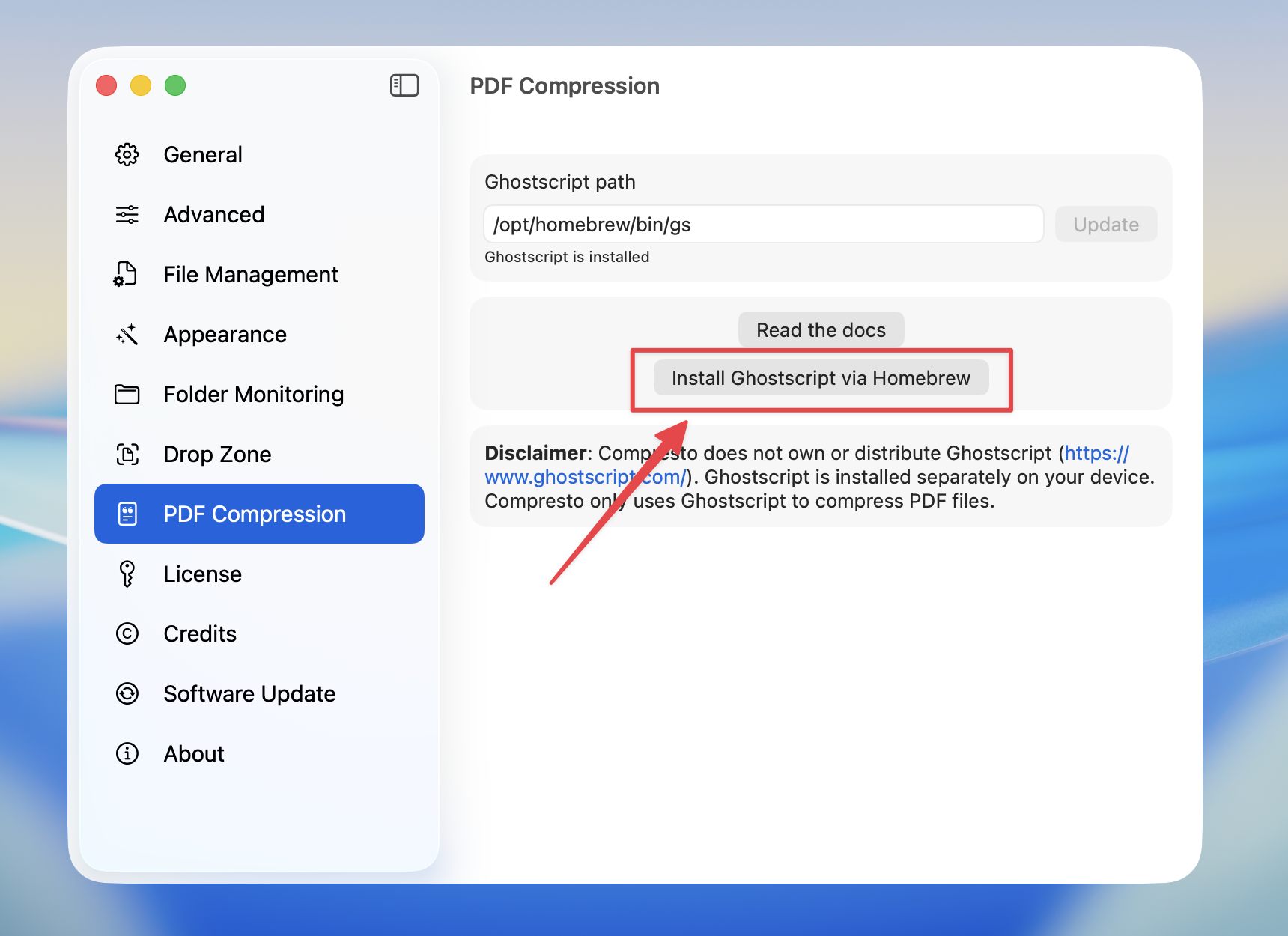 Compresto will run `brew install ghostscript` and automatically configure the path for you.
## Manual Installation
If you don't have Homebrew or prefer manual installation:
If you don't have Homebrew, install it from [brew.sh](https://brew.sh/)
```bash theme={null}
/bin/bash -c "$(curl -fsSL https://raw.githubusercontent.com/Homebrew/install/HEAD/install.sh)"
```
```bash theme={null}
brew install ghostscript
```
```bash theme={null}
which gs
```
**Expected output:**
* Apple Silicon Mac: `/opt/homebrew/bin/gs`
* Intel Mac: `/usr/local/bin/gs`
Download and install from [macports.org/install.php](https://www.macports.org/install.php)
```bash theme={null}
sudo port install ghostscript
```
```bash theme={null}
which gs
```
**Expected output:** `/opt/local/bin/gs`
## Configure Path in Compresto
After installation, set the Ghostscript path in Compresto:
Go to **Settings** > **PDF Compression**
Copy the output from `which gs` and paste it into the **Ghostscript path** field
Compresto will run `brew install ghostscript` and automatically configure the path for you.
## Manual Installation
If you don't have Homebrew or prefer manual installation:
If you don't have Homebrew, install it from [brew.sh](https://brew.sh/)
```bash theme={null}
/bin/bash -c "$(curl -fsSL https://raw.githubusercontent.com/Homebrew/install/HEAD/install.sh)"
```
```bash theme={null}
brew install ghostscript
```
```bash theme={null}
which gs
```
**Expected output:**
* Apple Silicon Mac: `/opt/homebrew/bin/gs`
* Intel Mac: `/usr/local/bin/gs`
Download and install from [macports.org/install.php](https://www.macports.org/install.php)
```bash theme={null}
sudo port install ghostscript
```
```bash theme={null}
which gs
```
**Expected output:** `/opt/local/bin/gs`
## Configure Path in Compresto
After installation, set the Ghostscript path in Compresto:
Go to **Settings** > **PDF Compression**
Copy the output from `which gs` and paste it into the **Ghostscript path** field
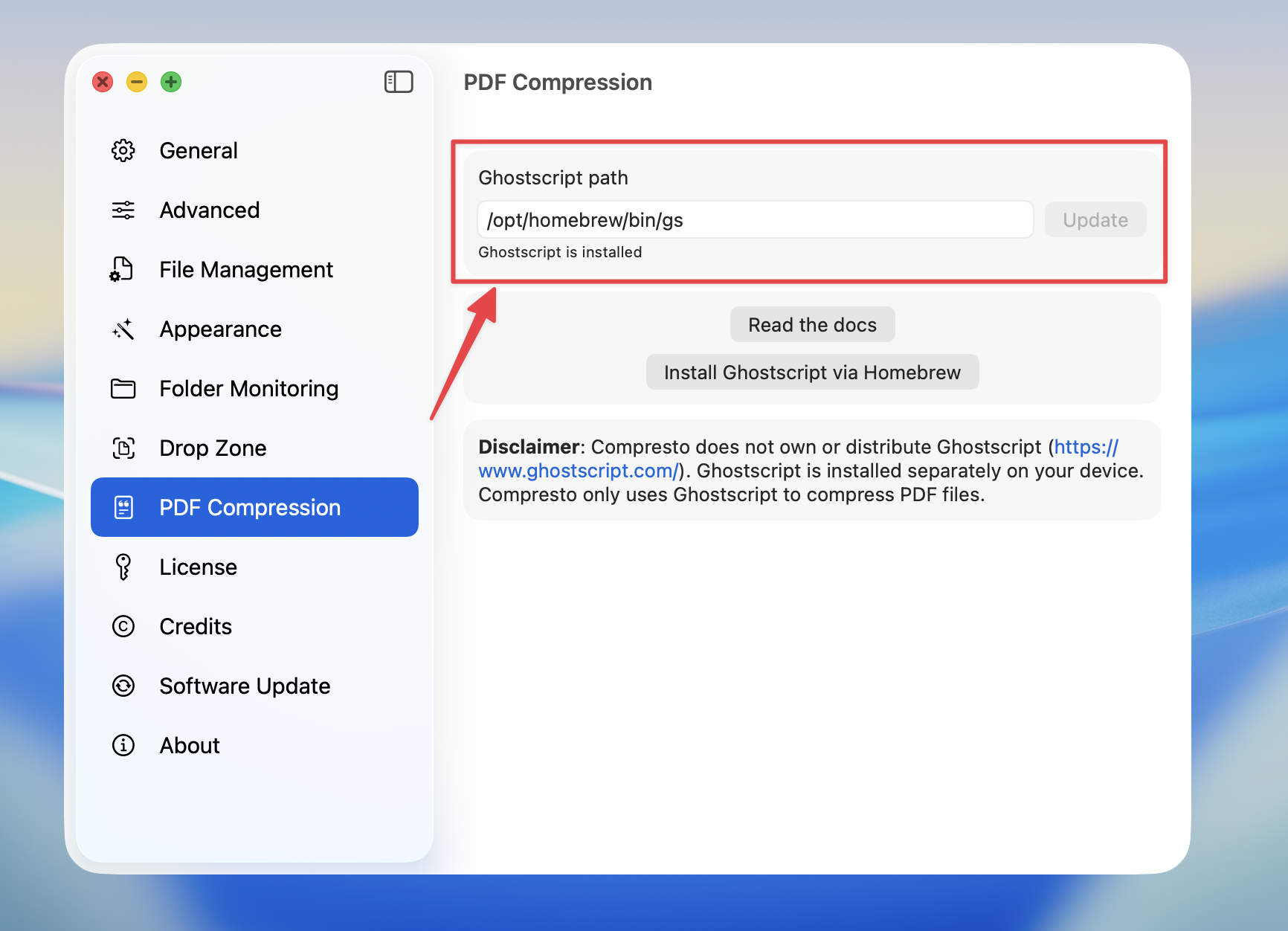 Press the **Update** button to save the path
## Common Paths
| Installation Method | Mac Type | Path |
| ------------------- | ------------- | ---------------------- |
| Homebrew | Apple Silicon | `/opt/homebrew/bin/gs` |
| Homebrew | Intel | `/usr/local/bin/gs` |
| MacPorts | Any | `/opt/local/bin/gs` |
## Troubleshooting
### "Ghostscript is not installed" error
This means the Ghostscript path is not configured. Follow the steps above to install and configure Ghostscript.
### Path not working
1. Open Terminal and run `which gs` to verify the correct path
2. Make sure the path ends with `/gs` (not `/ghostscript`)
3. Ensure Ghostscript was installed successfully by running `gs --version`
### Homebrew button not appearing
The **Install Ghostscript via Homebrew** button only appears if Homebrew is detected on your system. If you don't see it, install Homebrew first or use MacPorts.
## Disclaimer
Compresto does not own or distribute Ghostscript. Ghostscript is installed separately on your device and is used by Compresto solely for PDF compression.
## Licensing
Ghostscript is dual-licensed. The free version that Homebrew installs is distributed under the GNU Affero General Public License v3 (AGPL). A separate commercial license is available from [Artifex Software](https://artifex.com/) for use cases that are not compatible with the AGPL. If you are unsure which applies to your use, see [artifex.com/licensing](https://artifex.com/licensing/).
Press the **Update** button to save the path
## Common Paths
| Installation Method | Mac Type | Path |
| ------------------- | ------------- | ---------------------- |
| Homebrew | Apple Silicon | `/opt/homebrew/bin/gs` |
| Homebrew | Intel | `/usr/local/bin/gs` |
| MacPorts | Any | `/opt/local/bin/gs` |
## Troubleshooting
### "Ghostscript is not installed" error
This means the Ghostscript path is not configured. Follow the steps above to install and configure Ghostscript.
### Path not working
1. Open Terminal and run `which gs` to verify the correct path
2. Make sure the path ends with `/gs` (not `/ghostscript`)
3. Ensure Ghostscript was installed successfully by running `gs --version`
### Homebrew button not appearing
The **Install Ghostscript via Homebrew** button only appears if Homebrew is detected on your system. If you don't see it, install Homebrew first or use MacPorts.
## Disclaimer
Compresto does not own or distribute Ghostscript. Ghostscript is installed separately on your device and is used by Compresto solely for PDF compression.
## Licensing
Ghostscript is dual-licensed. The free version that Homebrew installs is distributed under the GNU Affero General Public License v3 (AGPL). A separate commercial license is available from [Artifex Software](https://artifex.com/) for use cases that are not compatible with the AGPL. If you are unsure which applies to your use, see [artifex.com/licensing](https://artifex.com/licensing/).